Reflection
The correct approach to learning software development - Part 2
Developing full stack web applications is a highly valued skill. Unfortunately it also involves overcoming an unexpectedly high learning curve. In my last post I talked about aspiring developers struggle learning software development, and what is the correct way to approach this learning curve. If you haven’t already, check out that article.
In this post I will go over some of the concepts that need to be understood before you can fully jump into writing a full stack web application.
This post is meant for people who have tried developing applications at least once or know how to code and want to jump into the world of development. If you are completely new to the programming world, this post is probably not the best way to start. If you are a veteran reading this, feel free to provide feedback and let me know if I missed something.
Client and Server
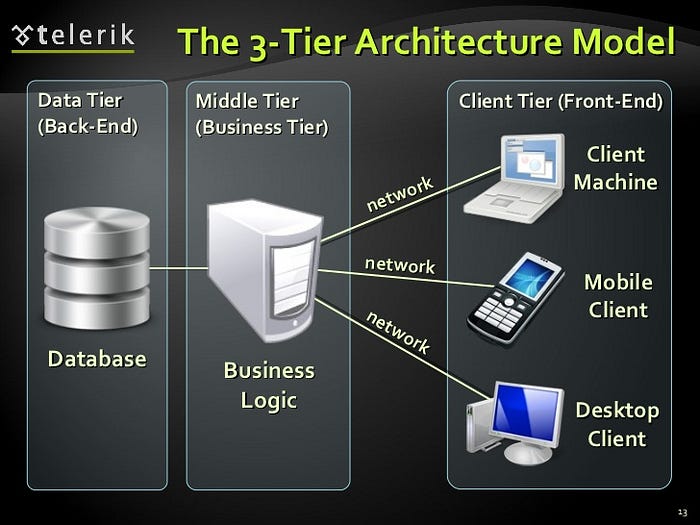
Client-Sever-Database model
Full-stack Javascript has made the lives of developers very easy. Unfortunately, it has also made the life of beginner developers a bit difficult, since now they have trouble differentiating client-side code from server-side code. Routing is especially more complicated since both client and server have routes, and neither of them follow the same structure as the project’s directory hierarchy. Often the HTML file sent by the server will include a to a CSS file, but it will never work because the CSS file was never exposed to the client.
One of the first steps while creating an architecture for a software is to break down the features and functionalities you want the application to have, and understand which tasks need to be assigned to the client and server, or both. Tasks involving a database should be done on the server, and tasks involving changes to the UI should be done on the client.
Learning how to make a client and a server talk to each other also takes time. This leads me to the next concept:
HTTP

HTTP 404 error
HTTP plays a major role in web applications, since it is the primary method of client and server communication. Unfortunately, the concept of HTTP requests and response takes a lot of time to grasp on to. Request methods, headers and body are not beginner-friendly concepts.
Basically, whenever a user needs to perform an action that involves the database, the client should send an HTTP request to the server. This request should have enough information about the action for the server to perform the appropriate actions. After the server acts on it, it should send a response back to the client. This response should have enough information for the client to acknowledge the user.
Let’s take an example of a basic Todo app (because why not). Let’s assume the user wants to create a new todo. This simple action has two different tasks:
- Adding this new todo to the list of todos being displayed on the UI. Since this task only affects the UI, it is done on the client side.
- Adding this new todo to the database. Since this task involves the database, it needs to be done on the server.
Now let’s go through the series of tasks that are required to complete the action of creating a new todo.
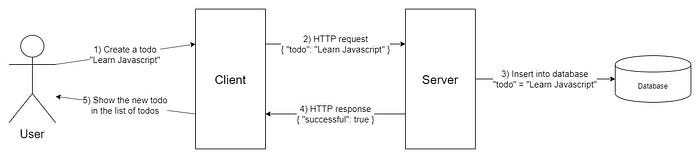
Tasks required for creation of a todo
- The user writes some text into a text input and hits the submit button.
- The client app sends an HTTP request to the server with enough information about the action, which in this case is just the todo text input (if you have authentication in your app then you will want to send user information, but for the purpose of this article we will keep it simple).
- The server reacts to this request by extracting the todo text from the HTTP request and saving it into the database.
- Once the todo has been saved into the database, the server sends a response back to the client. The only information needed in this response is whether the action (of saving the todo in the database) was successful. If it was not successful, the server needs to add the reason (if known) to the response.
- The client reads this response and if the action was successful, it adds the todo to the list of todos in the UI. If it was not successful, the client shows an error to the user stating the reason sent by the server.
You can see how a simple action involves multiple tasks to be executed by both the client and the server to be completed. Every functionality available in your application needs to be broken down like this, so that you know exactly where and what logic to write.
Also note that I was able to explain this whole procedure without using a single line of code. This is an example of how concepts can be developed independently without thinking of code, so that they can be applied anywhere regardless of what language or tools you are using.
Errors and Debugging
Error stack trace
Seeing large errors in the terminal or the browser console is the worst nightmare of beginner developers. Error messages often seem cryptic and hard to understand, especially when they are accompanied by what is called a “stack”, which is a long list of functions that the error has traveled through. Most of this stack is not really helpful while debugging, so one of they key steps while debugging is to identify the function in the stack that was written by you that could be the source of the error.
Error messages are mostly concise and tell you exactly what is wrong, so if you read and understand the message, you can save yourself a lot of time that would otherwise be spent on Stackoverflow and Github. Even if you don’t know how to fix the error, just knowing what the error is will significantly shorten the time spent on debugging since you know exactly what to look for.
Code Organization

Problems with 2000 lines of code in a singe file
Beginners usually have a hard time understanding modular code and separation of concern. This is usually because there is no “standard” way to organize your code. Sometimes frameworks like Angular provide their own opinions on how code should be organized, other times it’s the company’s own style guides. The important thing to keep in mind is that there is no “best” approach to write modular code, so you should pick one and stick to it. If you are working in a team, go with whatever is being used by everyone else. If you want to fly solo, look for some online style guides, or pick a framework that makes that decision for you.
Code organization is also not something that you should stress about if you are still learning the other concepts. Once you have wrapped your head around how to make an application work, you can work on organizing your code to make it easier on other developers or your own future self to comprehend it.
Make it work. Refactor. Make sure it still works. Repeat.
Refactoring is the process of restructuring existing code into a more organized and readable format. It not only helps make the code look better, but also helps you better understand the code. When you copy code from somewhere (which will happen a lot, and it is not a bad thing), you will rarely understand it fully. But when you tinker with it to make it fit with the rest of the code, you will have a better understanding of how the code is structured and how it works, which will in turn help you refactor it even better. This is especially true when using third-party libraries, which deserve their own section in this article.
Third-party libraries

Heaviest objects in the universe
Using external utility libraries have a bad reputation among beginners due to the way education material is structured, which encourage programmers to write all the logic they are going to use on their own. This is done to help them understand how code works on all levels, but should not be taken as a best practice when actually developing software. The concept of Don’t Repeat Yourself (DRY) is something you will see everywhere in development world, and is the core reason why frameworks and tools exist.
Unfortunately, this also means that as a beginner, you will be thrown into an environment where it takes over 5 minutes to complete an npm install and results in a huge node_modules folder. You will also be using a lot of code copied from existing projects, “Getting Started” pages and stack overflow. While understanding that code is not the very first priority, it should be top 5 in your todo list. Take help from peers and seniors to understand what the functions you imported from the packages are doing for you. Once you have a rough understanding of how it works, start refactoring. Keep modifying its structure until you break it, then Ctrl+Z and try another way to refactor it. Keep doing it until you feel confident around it.
Conclusion
This article might give you the feeling that I’m trying to scare people from getting into software development. But software development is a scary and complicated industry, and a lot of people are unaware of exactly what they are signing up for. This post is meant to let beginners know what to look out for, and to let seniors and educators better guide them into this world.
Thanks for sticking till the end! I appreciate any kind of feedback.